
Japanese transcription & voice recorder
Keep everything
you hear.
Mimitome saves your recording every few seconds and transcribes Japanese right on your phone. Your audio is not uploaded to a server, so meetings and classes stay private. No account, no ads, no subscription.
- 3 hours of transcription free each month
- Unlimited with a one-time Pro purchase
- iPhone & Android

An offline Japanese transcription app
Recordings that are hard to lose
Auto-saves every few seconds. If a call comes in or the app crashes, what you recorded so far is kept and restored the next time you open it. Recording continues with the screen off or while you use other apps, and the "Saved" label on the recording screen shows it is safe.
On-device speech to text
Download the Japanese speech data once (about 170 MB); after that, transcription works without internet. It starts automatically when a recording ends, and you can hide fillers like "eh" and "ano" for easier reading (the original transcript stays intact).
Listen again, fix it
Tap a line to play from that point, and change the playback speed. Fix misheard lines by hand, and label speakers so their names appear above the text.
Find it later
Search titles and transcripts together; hiragana and katakana match each other. Recordings are titled by date and time, and you can rename them.
Export as text
Export the transcript as text and share or copy it to mail, messaging or any app. Optionally add timestamps like [1:23] at the start of each paragraph.
Start recording fast
On iPhone: Lock Screen and Home Screen widgets, Control Center, the Action button (supported models), and Siri / Shortcuts. On Android: a Quick Settings tile, a home screen widget, and app icon shortcuts. One tap starts a recording.
Inside the app
Real screens from the app (iPhone, light and dark mode). The app is shown in Japanese; it can also be displayed in English.
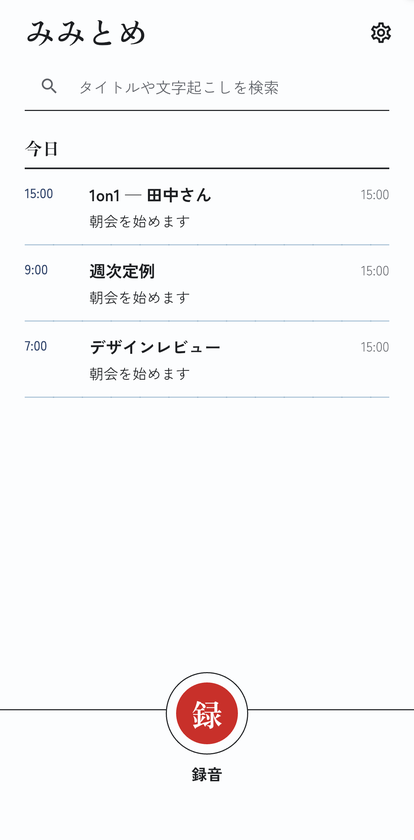
Home. Recordings are grouped by day, with start time and length. 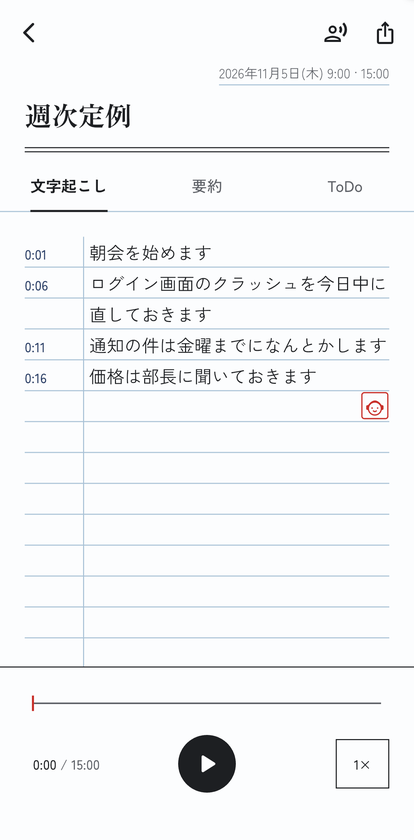
Transcript. Tap a line to play from that point. 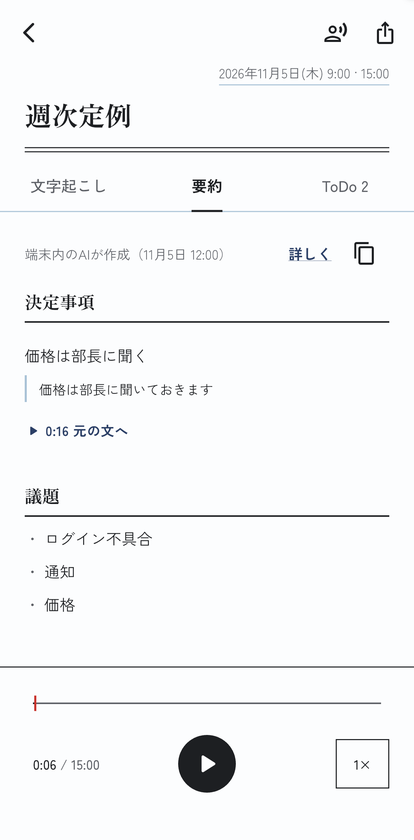
Summary (Pro, iPhones with Apple Intelligence). Each decision links to its source line. 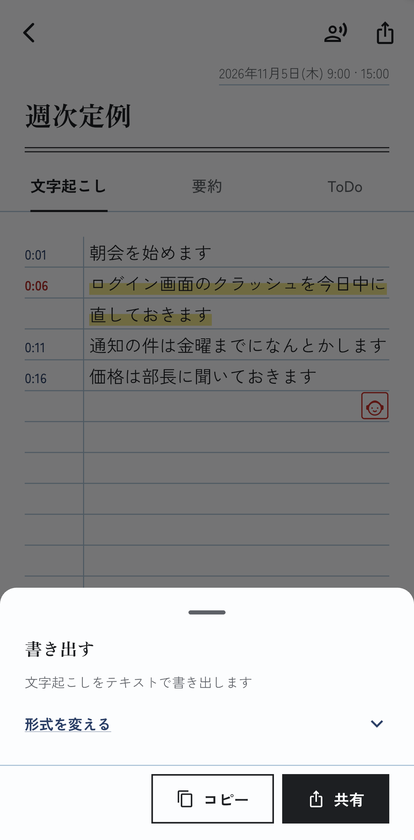
Export. Share or copy the transcript as text.


For meeting minutes and recorded lectures
- Meetings
Turn the recording into text as a first draft of your minutes. With Pro, export in a meeting-minutes layout with agenda, decisions and to-do sections.
- Classes
Record a lecture and review it as text later. Missed a part? Tap the line and listen from there.
- Interviews
Transcribe interviews and meetings. Label speakers and your export shows who said what.
- Voice memos
Record an idea in one tap from a widget or shortcut, and find it later with search.
No subscription — a one-time Pro purchase
Mimitome is free to start. Recording, playback, search and plain-text export stay free without Pro. Transcription is free for 3 hours a month, resetting on the 1st.
Free, always
- Recording and playback
- Search
- Plain-text export
- Transcription (3 hours a month)
Mimitome Pro (one-time purchase)
- Unlimited transcription
- AI summary, minutes and to-dos — only on iPhones that support Apple Intelligence (iOS 26 or later), generated on the device
- Custom vocabulary — names and terms spelled the way you want
- Export as Markdown or meeting minutes
Buy once, keep it. It never renews or charges you again.
Your recordings and text stay on this device
Recordings, transcripts, titles, custom words and summaries are stored on your device and are never sent to our servers. There is no account. To improve the app, Mimitome sends counts of features used and error reports, which you can turn off at any time under "Privacy" in Settings. See the privacy policy for details.
- Transcription is Japanese only for now (we add languages only after checking their accuracy). The app itself can be shown in Japanese or English.
- Transcripts and AI results can contain mistakes. Check important parts against the recording.
- Before recording other people, let them know and get their OK. Mimitome does not record phone calls.
